Client portal for small business: what it actually does (and when you don't need one)
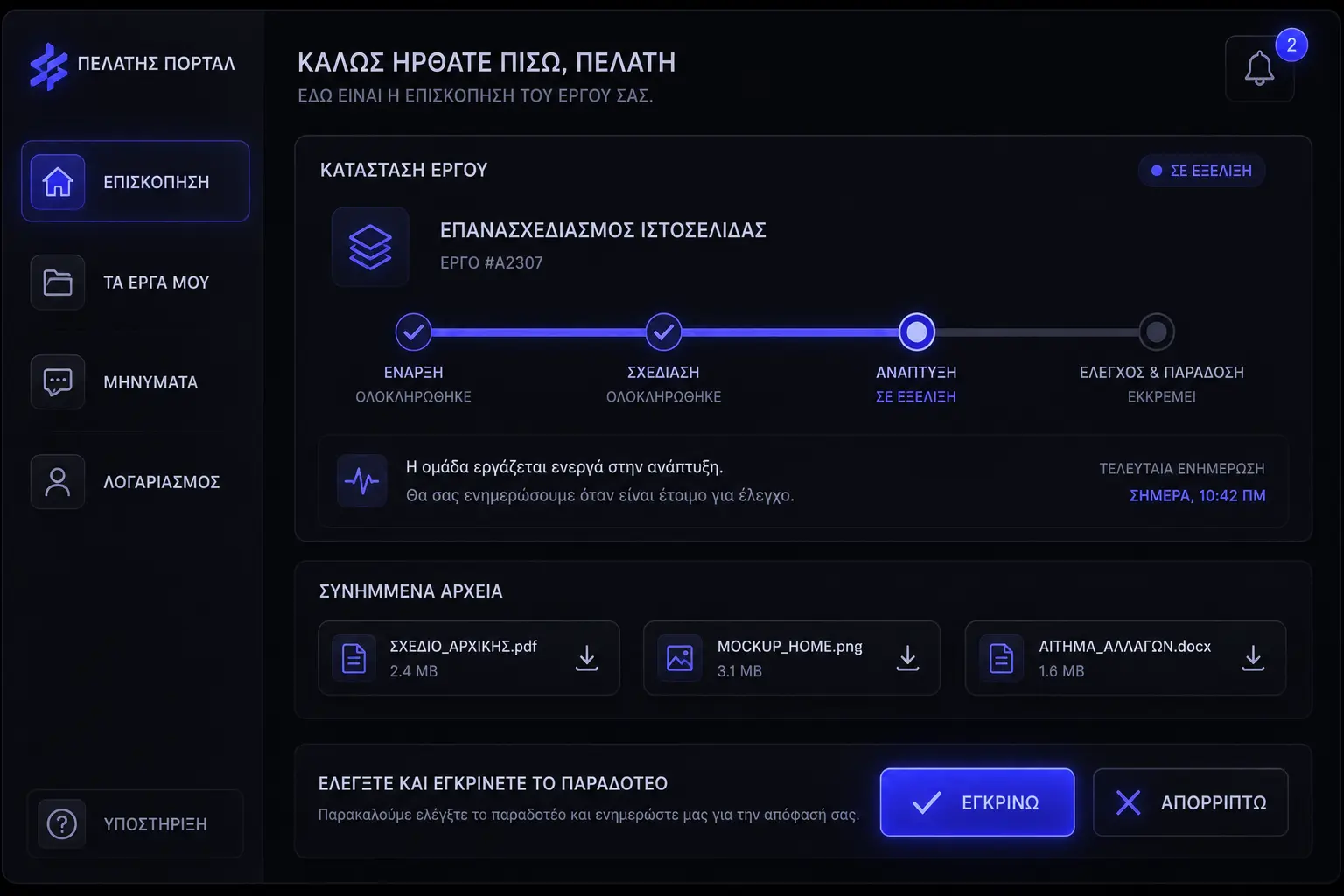
A client portal for small business is a shared login where your customer can see status, grab files, and approve work without hunting through email or DMs. It is not a second website. It is a room with a key. The only real question is whether enough traffic goes through that room to justify the lock — or whether you are about to pay for a dashboard that everyone ignores.
What does a client portal actually do?
Strip the product pages and you are left with three jobs: show where the work sits, keep the latest files in one place, and collect a yes or a no without a 14-message thread. Service businesses use that pattern for projects, invoices, and tasks [3]. Support teams use it so customers can raise a request and watch it move [2]. Billing tools use a narrower version so customers can update a card, pull invoices, and change a plan without emailing accounts [1].
If your portal cannot do those three jobs in under a minute, it is a pretty login screen. Clients do not want a product tour. They want “where is my thing” and “what do you need from me.”
What problems does it solve that email and DMs do not?
Email is a river. The latest file is whoever shouted last. A portal is a shelf: one status, one folder, one approval button. That is why firms that live on scattered threads keep reinventing the same “just checking in” message — the information existed, it just was not findable [4] [12].
- Status without a chase. The client can see “in review” without you typing it again. Delivery work goes quieter when the current phase is visible instead of implied [5].
- One file, not five versions. Attachments in email fork. A portal (or a tightly linked Drive folder) keeps the working copy where both sides already look [10] [3].
- A recorded yes. Approvals and invoice views live next to the work, which is easier to defend than a thumbs-up in a chat that vanished [1] [7].
- Fewer “what’s next” tickets. Self-serve help pages cut repeat questions when the answer is already written down [11].
When is a client portal overkill?
When you have three clients, one job at a time, and they already reply in a day. A shared folder plus a weekly email will beat a unused login. Portals earn their keep when volume, handoffs, or money-on-the-line make “search the thread” a tax. If you still have to screenshot the dashboard and paste it into WhatsApp, you did not buy a portal. You bought a second inbox.
- One-off projects with a known end date. A kickoff note, a shared folder, and a closing invoice is a complete system [10].
- Clients who will not create accounts. If your buyers are one-time and impatient, magic links or emailed PDFs will outperform a password reset loop [6].
- You have not named the source of truth. Software cannot fix two people updating two different lists. Write the process first [4] [12].
How is a portal different from a CRM, Drive folder, or status email?
A CRM is your side of the glass: pipeline, notes, who owes a follow-up. The client should not live in there. A Drive or Dropbox folder is files without a story — useful, but it will not tell them whether the proof is waiting on them [10]. A Monday status email is a snapshot that dies by Wednesday. A portal is the client-facing slice: only what they are allowed to see, current as of now [2] [3].
If you already run a decent CRM and a tidy folder, you may not need a new product. You may need a page that reads those two systems. That is often a thin web app or a piece of business systems work, not a 40-feature suite.
What should live in the portal — and what should stay out?
Put in: current phase, the files they must review, invoices and receipts, a place to approve or request a change, and the next date that matters. Leave out: your internal task board, messy drafts, other clients’ names, and every Slack aside you ever typed. HoneyBook-style portals are explicit about this split — clients see the project surface, not your pipeline [3]. Service desks do the same: the customer sees their request, not your backlog grooming [2].
- In. Status, latest files, invoices, approvals, and a short “waiting on you” list [1] [3].
- Out. Internal estimates, other customers, unfinished experiments, and anything you would not say in a kickoff meeting [9].
- Optional. A small help library for questions you answer twice a week [11]. Do not dump a wiki nobody will search.
How much does a client portal cost?
Off-the-shelf, it is often already in a tool you pay for: a client area in a studio CRM, a billing portal in Stripe, a request portal in a service desk [1] [2] [3]. You are paying in setup time and the habit of using it, not always in a new subscription. A custom build costs more because you are paying for the fit — your statuses, your files, your approval rules — the same way website pricing jumps when the job is not a template.
Budget the boring line items: who creates accounts, who resets passwords, who uploads files, and who answers “I can’t log in.” That last one is real customer service work, not a software feature [6]. If you skip it, the portal dies in week two.
Do you buy software, or build a custom one?
Buy when your process matches a common shape: creative studio, accountant-style file requests, subscription billing, or a help desk. Those products already solved login, notifications, and invoices [1] [3] [11]. Build when the portal is the product — unique statuses, odd approval chains, or data that must not live in a generic SaaS box. Look at our recent work if you want a sense of when a custom surface is the job, not a plugin.
- Buy. You can map your week onto their screens without renaming every field. Setup in days, not months.
- Build. Clients already log into something you own, and a second product would split the story. A focused web app can sit on top of what you have.
- Wait. You cannot describe the three screens yet. Write the email template and the folder rules first [12].
How do you get clients to log in instead of emailing you anyway?
You cannot. Not fully. You can make the portal the fastest path and stop rewarding the old path. Send a magic link or a one-tap “view status” in every update. Put the approval button in the email, but let the yes land in the portal so the record exists [3] [1]. When someone emails “any update?”, reply with the link, not a paragraph. After two of those, most people bookmark it.
- Login has to be boring. Password reset loops kill adoption. Magic links and saved sessions win [6].
- Put the ask on the first screen. If they have to hunt for “approve proof,” they will email you the same photo again.
- Do not dual-run forever. If you keep attaching the PDF and updating the portal, they will pick email. Pick one shelf [10].
Is a portal actually more secure than email attachments?
Usually, yes — if you set access on purpose. Email forwards. Chat screenshots. A portal can expire a link, limit a folder to one client, and take access away when the job ends [9]. Stripe’s hosted billing portal is built around a short-lived session for that reason: the customer gets a door, not a permanent skeleton key [1]. Google Drive sharing can be tight too, but only if you stop using “anyone with the link” for tax documents [10].
Security is still a habit. Turn on the least-access default. Review who still has a login once a quarter. That is the same hygiene as why website maintenance matters — unused accounts are how last year’s contractor still sees this year’s files [9] [8].
What should you ask a vendor before you say yes?
Ask to log in as a fake client. If they will not show you that screen, you are buying a demo, not a portal. Check how notifications work, how files version, who owns the data if you leave, and whether approvals are a real record or a comment thread. Fair-trading rules in Australia and consumer-facing guidance in the US both care that customers can see what they agreed to — a portal that hides terms in a maze is not a flex [7] [8].
- Client view first. Walk the first 60 seconds: login, status, file, approve [2] [3].
- Export. Can you leave with PDFs and a file archive, or are you hostage?
- Permissions. Per-client walls, not one folder for everyone [9].
- Notifications. Email when something needs them. Silence when nothing changed. Noise is how portals get muted [6].
How do you know you need one this year?
Count the last 30 days. If you answered “where are we?” more than a handful of times, or you sent the same file twice because nobody could find version three, you have a portal-shaped hole. If invoices and card updates already eat a morning a week, a billing portal alone may be the win — you do not have to boil the whole client experience [1]. If the pain is tickets and “did you get my email?”, a request portal or a help center is the narrower fix [2] [11].
- Need it. Several concurrent clients, money or approvals in flight, and a team that cannot all live in your head [4] [5].
- Maybe later. A shared folder plus a Friday status note still matches Friday. Keep that. Add software when the note starts lying [12].
- Not this. Your real problem is an unclear offer or a messy website. Fix the front door before you build a back office.
Can a portal replace status meetings?
It can replace the meeting that exists only to read the board out loud. It cannot replace the meeting where you make a decision nobody has written down yet. Keep a short live call for judgment. Put the facts where both sides can see them between calls [5] [12]. Clients still want to feel looked after — a portal that never speaks is a vending machine [6]. A one-line note in the portal when something slips is better customer service than a silent green bar.
Start with the three jobs: status, files, approval. Use the tool you already pay for if it can do those without a science project. Build only when the room has to match your business, not the other way around. If email is still faster after two weeks, you did not fail at software. You learned you needed a better shelf, not a fancier lock.
Sources & references
- Stripe Docs — Provide a customer portal to your customers.
- Atlassian Support — What is a portal? (Jira Service Management).
- HoneyBook — Client portal: share files, messages, and payments.
- Project Management Institute — Pulse of the Profession.
- Harvard Business Review — The Four Phases of Project Management.
- US Small Business Administration — Customer service.
- ACCC — Treating customers fairly.
- US Federal Trade Commission — Business guidance.
- NIST — Cybersecurity Framework.
- Google Drive Help — Share files from Google Drive.
- Zendesk — Help Center.
- ProjectManager — Project communication plan.
Figures, product names, and pricing may change after publication; verify with the source before relying on them.
Want a portal clients will actually open?
Talk to us arrow_right_alt