Client onboarding system small business owners should automate before they scale
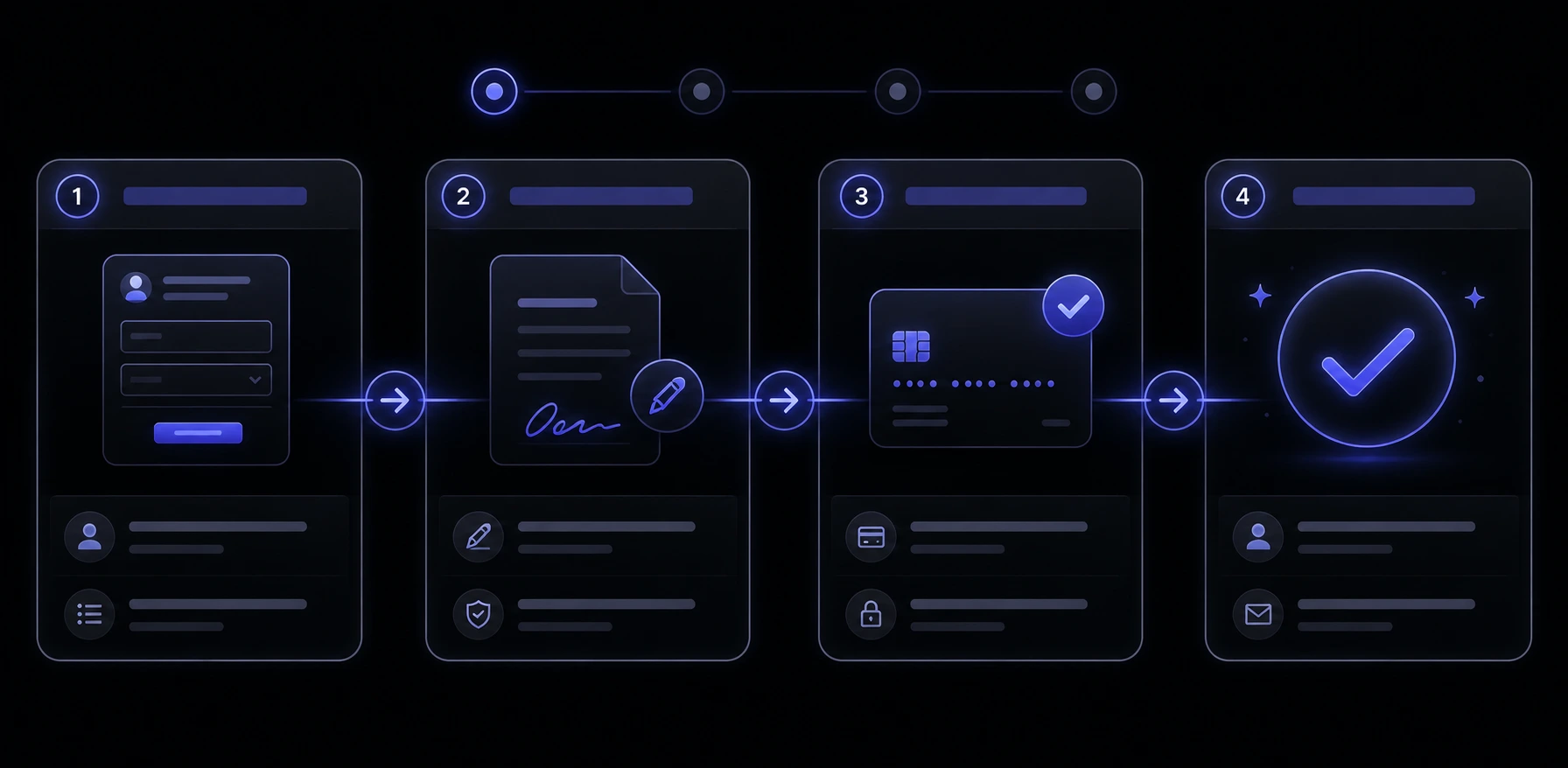
A client onboarding system small business owners actually finish is not a welcome email and a shared folder. It is the path from “yes, let’s work together” to money in, paperwork done, and a kickoff that does not depend on you remembering who is waiting. If you are past a handful of clients and still copy-pasting the same five messages, the system is already late — the question is which pieces to lock down first.
What actually counts as a client onboarding system?
Think of it as a pipeline with four jobs that always happen, even when you do them in DMs: collect what you need, get a signature, take the first payment, then start the work with a shared plan. Nielsen Norman Group’s usability work is useful here — first-time experience is judged by whether the next step is obvious, not by how pretty the portal looks [4]. Salesforce’s connected-customer research makes the same point from the buyer side: the experience around the work matters as much as the work itself [1].
- Intake. A form (or a short sequence) that captures scope, contacts, files, and the answers you used to chase in email.
- Agreement. A contract or proposal that can be signed without a printer, plus a stored copy you can find later.
- First payment. A deposit, retainer, or first invoice paid by card or PayPal — not a PDF that sits unread.
- Kickoff. A welcome that names dates, access, and who does what in week one. That is the checkmark, not the logo on the PDF.
If any of those four still live only in your head, you do not have a system. You have a habit that will break the week two new clients say yes on the same day.
When does doing it by hand start costing you growth?
Manual onboarding starts costing growth when a new yes creates a week of admin instead of a week of delivery. You feel it as delayed invoices, missing briefs, and kickoffs that slip because the contract is still “in their inbox.” Zendesk’s customer-experience research keeps the same warning: one messy first week is enough for someone to leave [2]. PwC’s customer-experience work is blunter about friction — people walk after a single bad interaction, even with a brand they liked [3].
For a service business, the cost is not only a refund. It is the project you could not take because Monday was spent chasing signatures, or the scope fight in week three because intake never asked the right question. The US Small Business Administration’s manage-your-business guidance is dry on purpose: growth needs repeatable processes, not more heroics from the owner [12].
What should you automate first — intake, the contract, or the first payment?
Automate the step that currently stalls the cash or the start date. For most studios and agencies, that is first payment plus the signature, then intake. A beautiful form that dumps answers into a spreadsheet does not help if the contract still sits unsigned for ten days.
- If invoices linger. Put a Stripe or PayPal pay link in the same email as the agreement. Stripe’s invoicing docs are built for this: send, remind, collect [6]. PayPal’s invoicing product covers the same job if that is what clients already trust [7].
- If signatures stall. Stop attaching a Word file. An e-sign request with a pay-after-sign rule will do more than another polite follow-up [5].
- If kickoffs start late because you lack files. Then intake is first. Gate the kickoff calendar until the form is complete.
Do not automate thank-you emails before you automate money and paper. Those are decorations on a leaky pipe.
How should an intake form work so clients actually finish it?
Short, sequential, and obviously useful to them — not a 40-field interrogation on night one. Ask only what you need to write the contract, schedule the work, and avoid a scope surprise. Nielsen Norman Group’s first-use research is the test: if the form feels like homework before any value, people abandon it [4].
- Split it. Company and contacts first. Scope and files after they have a date on the calendar. Nobody wants to upload brand assets before they know you are available.
- Explain why. One line under a field (“this is how we size the first sprint”) beats a mystery dropdown.
- Reuse what you already know. If the sales call captured budget and deadline, do not ask again. Prefill or skip.
- End with a human next step. “We review this within one business day and send the agreement” is a system. “Thanks, we will be in touch” is a void.
If the form is the front door to a booking or a consult, treat it like a product, not a survey. That is the same discipline as a booking system on your own site: the client should never wonder what happens after they click.
How do contracts and e-signatures fit the first week?
They sit between “we agree in principle” and “we can start.” Send the agreement as soon as scope is clear enough to price, and let them sign on a phone. DocuSign’s e-signature product exists because wet-ink is the delay, not the legal magic — electronic signatures are a normal way to close a business agreement in the markets this article is written for [5].
Keep the contract readable. Australia’s competition regulator is explicit that unfair terms in standard-form agreements can be a problem even when both sides clicked accept [11]. In the US, the Federal Trade Commission’s business guidance is the same idea in different clothes: do not hide the deal in a wall of text you would not say out loud [8]. A two-page scope, payment schedule, and change-order rule will get signed faster than a 19-page novel nobody reads.
Store the signed PDF where the delivery team can find it. If only you have the email, you do not have a contract system — you have a mailbox.
How do you collect the first payment without chasing inboxes?
Put the pay action in the same thread as the signature, with a due date and a card or PayPal option. Stripe invoicing supports reminders and hosted payment pages so you are not pasting account numbers into email [6]. PayPal invoicing is the fallback for clients who already live there [7]. Visa and Mastercard on a hosted page beat a bank transfer that “they will do on Friday.”
- Deposit before kickoff. If work starts when they pay 40–50%, say that in the proposal, then enforce it in the calendar. Unpaid kickoffs train people to treat you as a free holding pen.
- One link, one amount. Do not send a PDF invoice, a separate portal login, and a “or you can just transfer.” That is three ways to stall.
- Receipts that match the contract. The amount, currency, and what it covers should match the signed schedule. That is how you avoid the week-two “what was this charge?” email.
What should happen after they pay — the welcome and kickoff?
The welcome is a short, dated plan: who they meet, what you need by when, where files go, and how to reach you. It should fire when payment clears, not when you notice the notification three days later. Salesforce’s research on connected customers is really a warning about silence — people assume the relationship is broken if the next step never arrives [1].
A shared checklist works better than a 12-page welcome PDF. Point them at one place (a client portal, a Notion page, or a folder with a readme) and one owner on your side. If you already keep a small business website checklist for launches, steal that shape: numbered steps, owners, done-when.
Should a small team buy a tool stack or build a custom flow?
Buy first if you are under a few dozen new clients a year and the tools already talk to each other. A form tool, an e-sign tool, Stripe or PayPal, and a calendar will cover most studios. Build when you are copying data between four tabs, or when the client experience is part of what you sell and the glue keeps breaking.
Custom does not mean “rewrite QuickBooks.” It often means a thin web app that collects intake, writes the CRM row, and pings you when the deposit lands. That is the same job as business systems work: fewer handoffs, not a prettier dashboard. Zendesk’s CX research is relevant here too — customers do not care which vendor you picked; they care that they were not asked the same question three times [2].
How much does a proper onboarding stack usually cost?
Software is the cheap part. A form tool, e-sign, and invoicing on Stripe or PayPal is often tens to low hundreds of dollars a month, not a capital project [6] [7] [5]. The real cost is the week you spend writing the actual steps: what you ask, what you refuse to start without, and who owns exceptions.
A custom flow costs more because you are paying for design and the integrations, not for another SaaS logo. If you want a studio number rather than a guess, look at how we scope website pricing — the same rule applies to systems: you pay for the decisions and the connections, not for a login screen. Do not buy an “all-in-one onboarding platform” until you can list the four jobs it must finish without you.
What privacy and security rules apply to client intake?
Intake is other people’s data: names, emails, files, sometimes payment details and health or legal facts. Collect only what you need, say why, keep it somewhere you can lock, and delete it when the job is done. Australia’s Privacy Principles are a clean checklist even if you only have a few Australian clients: be open about collection, keep it secure, and do not treat a form as a souvenir drawer [9]. NIST’s small-business cybersecurity guidance is the practical US-side pair: unique logins, updates, and backups beat a fancy seal on the footer [10].
- Do not take card numbers in email. Use Stripe or PayPal hosted pages so you are not storing raw card data [6] [7].
- Lock the folder. Client files in a personal Drive link with “anyone with the link” is not a process. It is a leak waiting for a forwarded URL.
- Keep the stack updated. Forms, plugins, and portals rot. That is the same maintenance problem as a public site — see why website maintenance matters [10].
How do you know the system is working?
Measure time-to-cash and time-to-kickoff, not how many automation emails you sent. A working system shortens the gap from verbal yes to paid, signed, and scheduled. PwC’s friction research is the client-side version of the same metric: if the first week feels messy, they will not wait around to see if delivery is good [3].
- Time from “yes” to signed agreement. If this is still measured in weeks, the contract step is the leak [5] [8].
- Time from signed to first payment. If this is days of chasing, the pay link is in the wrong place [6] [7].
- Kickoffs that start on the promised date. If you keep sliding them because intake is incomplete, the form is not required enough [4] [12].
- Repeat questions. If the same client answers “who is the billing contact?” three times, the tools are not talking [1] [2].
When is it time to replace the patchwork?
Replace the patchwork when a missed step has a name and a dollar amount — a project that started without a deposit, a scope fight you cannot point at a signed line, or a week you cannot take new work because onboarding is a second job. The SBA’s process advice is not glamorous, but it is the line: if growth depends on you personally remembering the sequence, you are the bottleneck [12]. Unfair or unclear terms that you keep explaining in Slack are also a sign the agreement itself needs a rewrite, not another reminder email [11] [8].
You do not need a 40-step machine on day one. You need intake, signature, first payment, and a kickoff that fires without you. Automate those four, keep the data boringly secure [9] [10], and only then decorate with nurture sequences. That is a client onboarding system a small team can run when two people say yes in the same afternoon.
Sources & references
- Salesforce — State of the Connected Customer.
- Zendesk — Customer Experience Trends.
- PwC — Future of Customer Experience / Consumer Intelligence Series.
- Nielsen Norman Group — Usability 101: Introduction to Usability.
- DocuSign — Electronic signature product overview.
- Stripe Docs — Invoicing.
- PayPal — Invoicing for business.
- US Federal Trade Commission — Business guidance.
- OAIC — Australian Privacy Principles.
- NIST — Small Business Cybersecurity.
- ACCC — Unfair contract terms.
- US Small Business Administration — Manage your business.
Figures, product names, and pricing may change after publication; verify with the source before relying on them.
Want a cleaner onboarding flow?
Talk to us arrow_right_alt