Does my small business need a CRM, or just a better system?
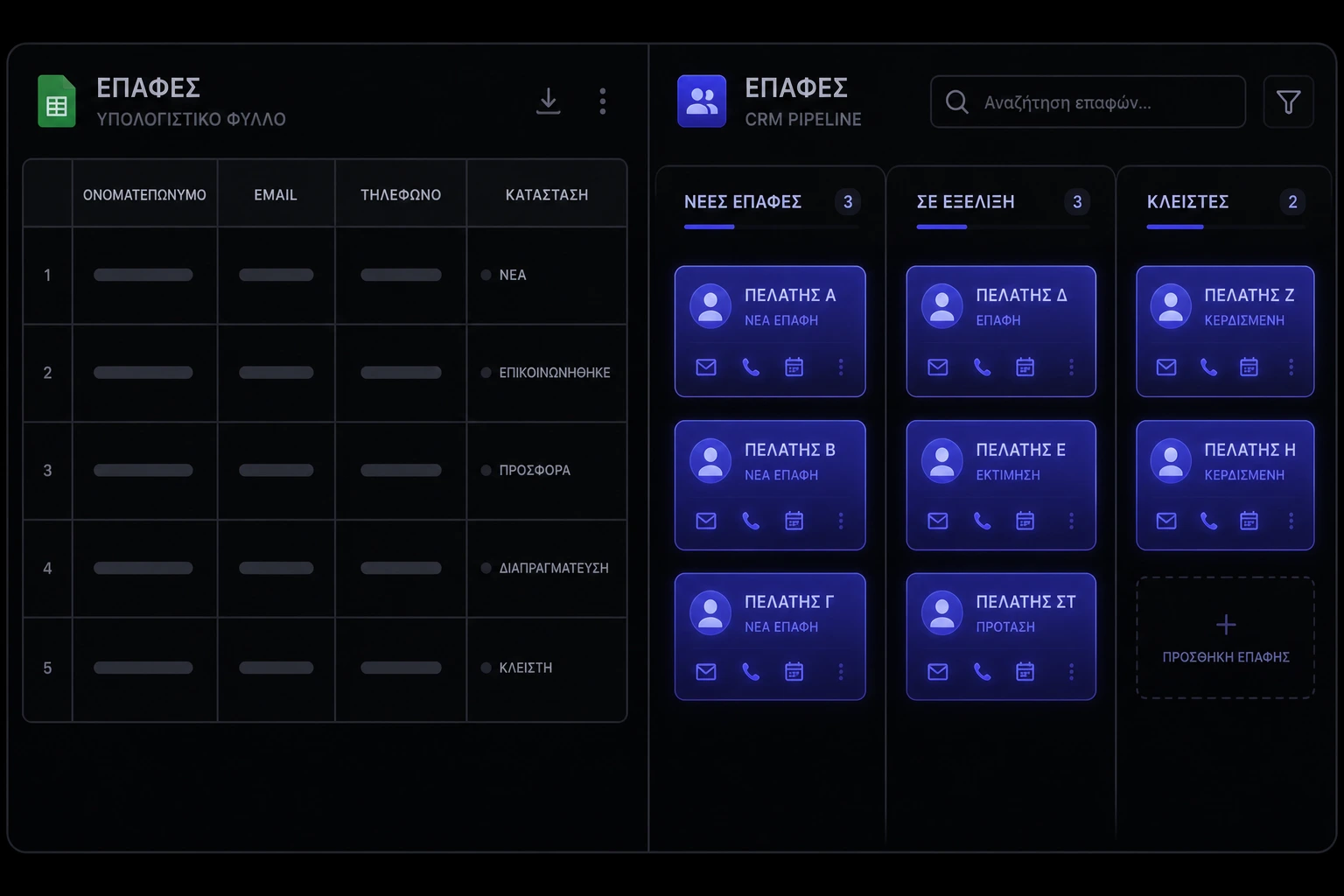
The question is not which logo to buy. The question is: does my small business need a CRM, or do you just need one shared list, a follow-up habit, and fewer places to lose a name? A CRM is software that remembers who someone is, where they sit in a deal, and what should happen next — across the whole team, not only in your head [1] [2]. A spreadsheet can do a thin version of that for a while. The decision is about pain, not prestige.
What does a CRM actually do that a spreadsheet does not?
A CRM is a customer database with a pipeline, activity history, and usually some automation: reminders, assignment, and a place every email or call can land [1] [5]. Gartner's definition is dry on purpose: it is a strategy and a set of technologies for managing the customer relationship, not a magic sales department [2]. Spreadsheets store rows. They do not reliably tell you who owns the next step, when it is due, or which version of the file is true.
- Shared truth. One record per contact, not four tabs named leads-final-v3.
- Pipeline stages. You can see volume and stuck deals, which pipeline-first tools are built around [5].
- History. Notes, emails, and next actions sit on the person, so a sick day does not erase the relationship [1] [11].
When is a spreadsheet still the right customer list?
If you are the only person selling, you have fewer than a few dozen active conversations, and you actually open the file every day, a well-named sheet is a system. Spreadsheet tools are fine as a pipeline when the columns are stage, next date, and amount — and you treat the date as a promise [11]. The US Small Business Administration's marketing guidance is the same idea at owner level: know who you are talking to and follow up on purpose, even if the tool is simple [9].
- One owner. Nobody else needs to log in for the list to stay true.
- Short cycle. If a lead is won or lost in days, a full CRM board can be extra furniture.
- Clean columns. Name, company, source, stage, next step, next date. That is a CRM. It just lives in a grid.
What pain points mean the spreadsheet has stopped working?
The sheet failed when you cannot trust it. Duplicate rows, a second salesperson with a private copy, follow-ups that only exist in a chat thread, and "who was supposed to reply?" are the tells. Harvard Business Review's long-standing warning still holds: CRM projects fail when you install software on top of a messy process and hope the tool will enforce discipline [3]. Research on B2B buying is the other half: buyers already bounce between digital research and human conversation — if your follow-up is a sticky note, you will lose the ones who went quiet [4].
- Two people, two lists. The moment a colleague cannot see your notes, you have a coordination problem, not a typing problem [3].
- Follow-ups slip weekly. If "I meant to email them" is a running joke, you need reminders that do not depend on memory [5].
- Reporting is a rebuild. If a pipeline snapshot means an evening of copy-paste, the sheet is no longer cheaper [12].
Does a small team with only a handful of clients still need one?
Not automatically. Ten retainer clients in a sheet can be healthier than a half-empty enterprise CRM nobody opens [1] [11]. Need shows up as missed renewals, confused handoffs, and the same discovery call twice. If you already run onboarding, invoices, and delivery in different inboxes, a CRM is one way to glue that — it is not the only way.
If you have one owner, a handful of clients, and a sheet you actually maintain, skip the purchase. Spend the money on the process: a named next step, a weekly review, and a place files live. You can revisit the buy when a second person starts selling, or when the sheet has more tabs than clients.
What does a CRM actually cost besides the monthly fee?
The subscription is the obvious line. Pipedrive, Zoho, Salesforce, and Microsoft all publish plans you can compare, and software directories exist so you can see the field without believing any one vendor's homepage [5] [6] [1] [11] [12]. The real cost is setup: importing messy contacts, deciding stages, training people, and killing the old sheet so it cannot become a shadow CRM [3].
- Licenses per user. Cheap per seat still adds up when everyone might need access.
- Implementation time. A month of mapping fields is normal. A quarter of arguing about stages is a process problem wearing a software costume [3].
- Switching cost. Exports are never as clean as the demo. Budget for that before you fall in love with a trial.
If you want a studio-side number for related build work, look at how we talk about website pricing — you pay for decisions and integrations, not for another logo.
Should you buy a product or build a custom system?
Buy first if your process is a normal pipeline: lead, conversation, proposal, won or lost. Zoho, Pipedrive, Salesforce, and Dynamics exist because that shape is common [6] [5] [1] [11]. Build when the CRM would be a square peg: a booking-led service business, a productized studio with a weird intake, or a team that needs the record of work to live next to the record of the client.
Custom does not mean rewrite the big-vendor product. It often means a thin web app or a piece of business systems work that owns intake, status, and the next task — and maybe syncs to a lighter CRM later. If you already have a public site, keep that as the front door; the CRM is the back office. See the small business website checklist for the public-facing half so you are not stuffing operations into a contact form.
How do you know people will actually use it?
They will use it if it is faster than not using it. The classic CRM failure modes are mostly people problems: no executive owner, no process change, too much technology, and users who were never asked [3]. If logging a call takes longer than the call, they will lie to the system. If the CRM is where the next invoice or the next appointment is created, they will live there.
- One owner. Someone with authority to delete unused fields.
- Stages that match real work. If you do not have a proposal-sent moment, do not invent one for the software [5].
- Login that is not optional. If the sheet stays open beside the CRM, the sheet will win [3].
What should you put in the CRM first?
Less than you think. Name, company, email, source, stage, owner, next step, next date. That set already beats a heroic import of every newsletter subscriber from years ago [9]. Privacy is part of this: Australian Privacy Principles and basic US small-business cyber guidance both say collect what you need, say why, and lock it [10] [7]. Broader US business guidance is the same tone: do not be sloppy with other people's contact details just because they filled in a form [8].
- Active pipeline only. Archive the graveyard; do not migrate it as if it were gold.
- Source. So you can tell referrals from ads without a folklore meeting [9].
- Next date. A CRM without a next date is a contacts app.
How should a CRM connect to your website, inbox, and invoices?
The CRM should receive the lead, not hide it. A form on your site should create a record, not a notification you paste by hand. Email and calendar sync is table stakes on most mid-market tools [1] [11]. Invoices can stay in your accounting or payment tool — just store the status and the link on the contact so you are not hunting PDFs.
- Form to record. If the website is the front door, the CRM is the hallway. Do not leave people on the mat.
- Inbox without a second brain. If you must copy-paste every email, adoption will die [5].
- Money nearby. You do not need billing inside the CRM on day one. You need to see unpaid versus in-progress without opening four tabs.
What should you ask before you buy or hire?
Ask what happens when you leave, who owns the data, and what implementation actually includes. Roundups are useful for feature lists; they are not a replacement for a trial on your real pipeline [12]. If a vendor cannot export your contacts in a format you can open, you are renting a filing cabinet with no key [7] [10].
- Export. Full contacts, notes, and activities — not a pretty PDF.
- Permissions. Can a junior see every deal? Should they?
- Fit. If you are buying custom work, contact us with the process, not with a brand name you saw in an ad. Look at our recent work if you want a sense of how we attach systems to real sites.
How do you know the CRM is actually working?
Pipeline visibility and fewer dropped follow-ups. You should be able to answer, in five minutes: how many live deals, which are stale, who owns them. If buyers research on their own, your system has to notice silence, not only inbound enthusiasm [4]. Forecasting theatre can wait until the basic board is true [1] [11].
- Stale-deal count. If nothing is overdue, the dates are fake or the board is empty.
- Time-to-follow-up. Hours, not sometime this week [5].
- Single source. If people still keep a private sheet, you bought software and kept the old system [3].
You do not owe anyone a CRM logo. You owe the business a memory that survives a holiday, a second hire, and a client who emails a different person. If a spreadsheet still does that, keep it. If it does not, buy a tool that matches your actual stages — or build the thin system that does — and kill the shadow list on day one.
Sources & references
- Salesforce — What is CRM?.
- Gartner Glossary — Customer Relationship Management (CRM).
- Harvard Business Review — Avoid the Four Perils of CRM.
- McKinsey — The future of B2B sales is hybrid.
- Pipedrive — What is CRM?.
- Zoho CRM.
- NIST — Small Business Cybersecurity.
- US Federal Trade Commission — Business guidance.
- US Small Business Administration — Market your business.
- OAIC — Australian Privacy Principles.
- Microsoft — Dynamics 365 Sales.
- Capterra — Customer Relationship Management Software.
Figures, product names, and pricing may change after publication; verify with the source before relying on them.
Want a client system that matches how you actually sell?
Talk to us arrow_right_alt